How to Buy on Exportain
A step-by-step walkthrough of buying on Exportain, from searching the catalog and reading supplier trust badges to posting an RFQ, comparing quotations, and arranging freight and inspection.
Short answer
To buy on Exportain, search the product catalog, review supplier profiles and their trust badges, then send an order request or post an RFQ with quantity, target price, destination, Incoterm, certifications and deadline. Compare versioned quotations, counter-offer in the same thread, and accept one to create an order record. Settle payment directly with the supplier, or use an agreed funds hold, then arrange freight and inspection.
On this page
Buying on Exportain follows platform steps that start with search and end with freight and inspection. The platform buying guide lists eight steps, each available on the platform today.1 This guide follows those steps in order, explains what to check at each one, and separates what the platform records from what stays between buyer and supplier.
In short, you find products and suppliers, read what each profile and badge actually shows, then move into an order request or an RFQ. Quotations stay versioned and visible to both sides, acceptance creates an order record, and payment is settled directly unless both sides agree to a funds hold.1
What it is
How to Buy on Exportain is the buying path on a B2B marketplace connecting international buyers with Bangladeshi suppliers, exporters, and trade service providers. Search and supplier profiles help you shortlist, an order request or an RFQ starts the commercial discussion, and the quotation record carries the agreed terms forward into an order.1
Two limits shape the whole path. Trust badges record checks the Exportain team has reviewed, and a badge is not a capacity or quality guarantee, so read what each badge covers before you rely on it.2 Exportain is also not a party to the contract between buyer and supplier, and it does not arbitrate commercial disputes; if a trade goes wrong, it reviews the recorded history and may suspend or remove an account that breaches the terms of use.3
The platform gives you a searchable catalog, supplier profiles, a recorded quotation trail, and dispute and reporting routes. The commercial terms, inspection and shipment conditions, and payment arrangement are matters you agree with the supplier, in writing, inside that recorded trail.
Who it is for
This path is for buyers sourcing products from Bangladesh who want to compare suppliers on one marketplace before committing to terms, whether still shortlisting or ready to request quotations for a defined requirement.
The other side of the marketplace is Bangladeshi sellers, whose membership page lists seller plans only: Free, Gold, and Platinum, with different listing quotas, inquiry limits, and team seats.4 Membership never grants a verification badge, and verification is reviewed separately.2 The supplier directory lists registered suppliers, with trust badges shown on each row that has earned them.5 The RFQ pages present open buying leads from international buyers that registered Bangladeshi suppliers can quote against.6
Step-by-step with screenshots
The steps below follow the eight steps published on the platform buying guide, in the same order, and this article follows that published text rather than adding screens, fees, or timelines the pages do not show.
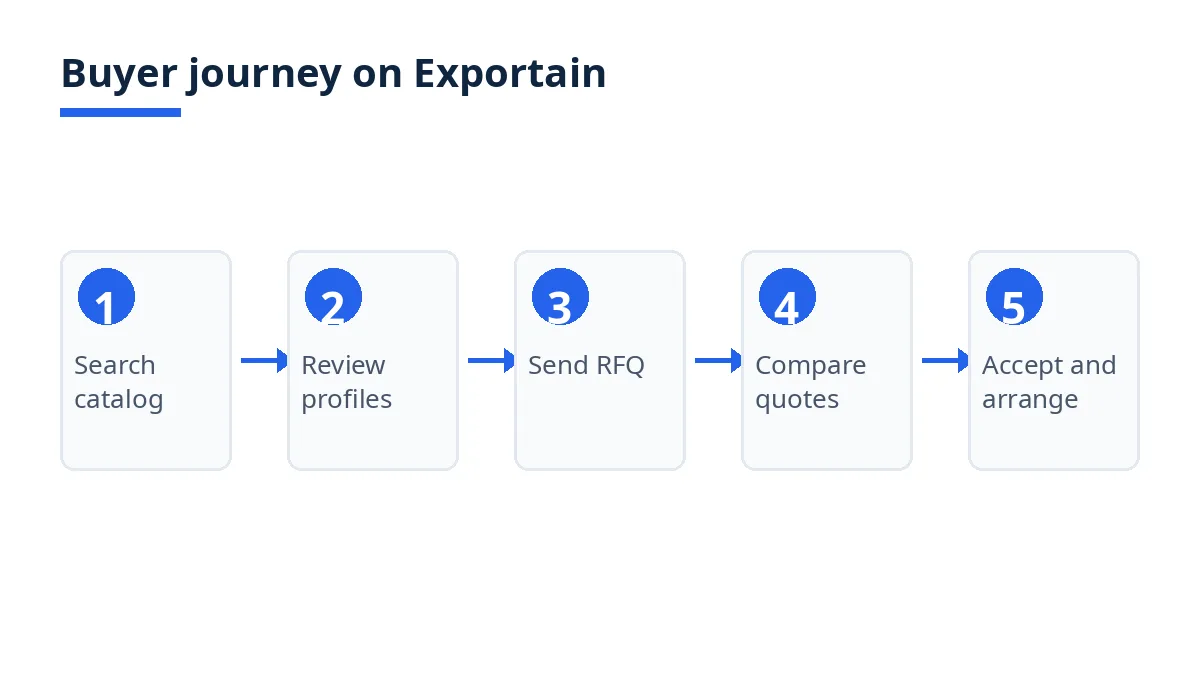
The diagram below shows the journey in five stages, from search to settling and arranging delivery.
Search the catalog. Search published products by keyword and category. Filter by Exportain Verified badge, sample availability, and OEM or ODM capability, and sort by MOQ or lead time.1 Start broad, then narrow by the filter that matters most for your order.
Review supplier profiles. Each profile shows the supplier verification level, location, main products, and certifications the supplier has declared.1 Ask for the underlying document when a certification affects your buying decision.
Understand trust badges. Badges such as Exportain Verified and Export Verified record which checks the Exportain team has reviewed, and a badge is not a capacity or quality guarantee.1 Verification is a document review by the Exportain team, not a factory inspection and not a check against any government database, and it is free and never purchased.2 A company without a badge shows nothing, not a placeholder.2
Badge | What Exportain has checked |
|---|---|
Exportain Verified | Identity, phone, email, and business registration |
Export Verified | Export Registration Certificate (ERC) |
Factory Verified | Photos of the manufacturer factory |
Trading Company Verified | Photos of the trading company office or warehouse |
Trusted Trader | Completed orders on Exportain with no disputes |
Send an order request. Add products from one or more suppliers to your cart and send each supplier an order request, or message a supplier directly from its profile.1 Use this route when you already know the product and the supplier; use an RFQ when you want competing quotations.
Post an RFQ. State quantity and unit, target price, destination, Incoterm, required certifications, and deadline. Suppliers in that category can view it and quote against it.1 Open buying leads are posted by buyers, and registered Bangladeshi suppliers can submit a quotation against any of them.6
Compare and accept quotations. Every quotation is versioned: unit price, MOQ, lead time, Incoterm, payment terms, and validity. Counter-offer in the same thread, and accepting creates an order record with those terms.1 On acceptance, Exportain creates one order and issues one proforma invoice from the accepted terms, and a quotation can be accepted once.2 Both parties see the same history.3
Agree and settle payment directly. Settle on the accepted terms directly with the supplier, with inspection and shipment conditions agreed in writing first.1 If the supplier asks for a funds hold, you can pay it by card or decline it. Exportain keeps a paid hold until the supplier has filed an export clearance document and you have confirmed the trade complete, then releases it to the supplier; if either party disputes it, the money is frozen and Exportain staff decide whether to release it or refund it.2 Without a hold, payment is arranged between buyer and supplier on the proforma invoice terms.2
Arrange freight and inspection. Look up freight rates published by forwarders on Exportain, and request quotes from listed freight, customs, and inspection providers.1 Arrange these after the commercial terms are settled, so the quotes match the agreed Incoterm.
Tips
Read the badge before you rely on it. Exportain Verified covers identity, phone, email, and business registration, while Factory Verified covers factory photos, so match the badge to the risk you are checking.2
Keep the commercial discussion in the quotation thread. The RFQ, every quotation version, every counter-offer, and the accepted terms are stored server-side and seen by both parties.3 A term agreed outside that thread is harder to prove later.
Agree the full set of terms in writing before paying. Before paying, agree the Incoterm, payment schedule, inspection, and shipment terms in writing in the quotation record.3 Exportain does not guarantee refunds, so the written terms are your main protection.3
Use the reporting route for misrepresentation. Counterfeit certificates, a company claiming another factory, or a listing that misstates its product should be reported to the verification team, where reports are handled by people.2
FAQs
Is it free?
The platform pages read for this guide do not list a buyer fee for searching the catalog, browsing supplier profiles, or posting an RFQ. The membership page lists seller plans, Free at no charge, Gold at 499 BDT per month, and Platinum at 999 BDT per month, governing seller listing quotas and inquiry limits rather than buyer access.4 Supplier verification is free and never purchased, and membership plans never grant a trust badge.2
How long does it take?
No fixed timeline is published on the platform pages read for this guide. The pace depends on supplier responses, quotation versions, and, where a funds hold is used, the supplier filing an export clearance document and the buyer confirming the trade complete.1 2 Record any timeline a supplier gives in the quotation thread before acceptance.
Who can use it?
International buyers sourcing from Bangladesh can use the buying path, and registered Bangladeshi suppliers quote against open buying leads.6 Buyer and supplier accounts confirm ownership of an email address or phone number with a one-time code, and sessions are issued per device and can be signed out.2 Resolve any account check problem before posting an RFQ, since the quotation trail is tied to the account.
Where can I get support?
If a supplier does not honor accepted terms, contact Exportain with the order reference, so the team can review the recorded RFQ, quotation, and message history.3 If the problem is suspected fraud or misrepresentation, such as a counterfeit certificate or a company claiming a factory it does not represent, report it to the trust and safety team, where reports are reviewed by a person.2 Exportain may suspend or remove accounts, but it does not act as a court and cannot compel payment or delivery.2
Next steps on Exportain
Start with the platform buying guide itself, which lists the eight steps in full: How to Buy on Exportain. Before you accept a quotation, read the Trust Center for what each badge covers and what it does not, and read Buyer Protection for the quotation trail, the funds hold, and the dispute and reporting routes.
Sources
- How to source and buy from Bangladesh. Exportain (accessed )
- Trust & Safety Center. Exportain (accessed )
- Buyer protection: What Exportain does to protect buyers. Exportain (accessed )
- Seller Membership & Quota Plans. Exportain (accessed )
- Bangladeshi Manufacturers & Exporters. Exportain (accessed )
- RFQs & Buying Leads from International Buyers. Exportain (accessed )
About the author
Sourcing from Bangladesh?
Post a request for quotation and suppliers on Exportain can send you their quotes directly.
Post an RFQ