Exportain Trade Intelligence
Exportain Trade Intelligence explained: EPB destination figures, supplier and listing signals, and quotation checks buyers read before contacting a supplier, with limits stated plainly.
Short answer
Exportain Trade Intelligence is the published Bangladesh export data on Exportain: EPB destination figures plus supplier, listing, and quotation signals buyers read before contacting a supplier, with each figure and badge read against its stated limit, and no refresh schedule or buyer fee published on the pages read.
On this page
Exportain Trade Intelligence is the data a buyer can read on Exportain before contacting a supplier. Its core page sits at exportain.com/trade-intelligence, and the page as read on 2026-10-25 is titled Bangladesh Export Statistics (EPB).1 It is a table of Bangladesh exports by destination market, with each row stating its own source, period, and status.1 Around that table, the platform publishes the other signals a buyer uses to judge a supplier and a category: category listings, supplier profiles and badges, listing terms, and versioned quotations. This guide covers that data side only, not the safety hub, buying journey, RFQ flow, protection summary, or badge meanings in full.
What it is
The Trade Intelligence page presents one table: destination markets with export values from the Export Promotion Bureau (EPB).1 The rows as read give the United States at $9.05B, Germany at $4.72B, and the United Kingdom at $4.67B, followed by Spain, the Netherlands, France, Japan, and Australia.1 Every row carries the same source note: Export Promotion Bureau, period ending 30 Jun 2026, recorded in US$ billion, provisional, retrieved 18 Sep 2026.1 Three limits follow: the figures are provisional, not final; they are totals by destination market, not for one product, category, or supplier; and the page shows no per-category demand table, price index, or forecast, and no refresh schedule.
The home page describes this section in wider terms, stating that export figures come from the Export Promotion Bureau and every number states its release, period, and provisional or final status.2 This guide claims only what the fetched destination table shows.
The rest of the intelligence is supplier and category data, not statistics. The catalogue can be searched by keyword and category, filtered by Exportain Verified badge, sample availability, and OEM/ODM capability, and sorted by MOQ or lead time.3 Each profile shows verification level, location, main products, and certifications the supplier has declared.3 The directory lists registered suppliers, with badges shown on each row that has earned them.4 Listings carry MOQ and tiered unit prices where the seller has set them, and quotations state unit price, MOQ, lead time, Incoterm, and validity.3 Trade services are listed separately, with price, coverage, and turnaround published by providers.2
Signal | Where it appears | What it tells a buyer | Its limit |
|---|---|---|---|
Destination export values | Trade Intelligence page | Scale of each destination market, from EPB figures | Totals by market only, provisional, not per product |
Category listings | Catalogue pages | Which categories and listings exist today | Existence is not proof of capacity |
Supplier badges | Profiles and directory rows | Which document checks staff have reviewed | Not a guarantee of capacity, quality, or delivery |
Listing terms | Product listings | MOQ, price tiers, and lead time as set by the seller | Seller-stated until quoted and agreed |
Quotation versions | RFQ thread | Price, MOQ, lead time, Incoterm, and validity in one record | An offer, not a completed order |
Service listings | Trade services pages | Freight, customs, and inspection options with price and coverage | One provider's offer, checked only as its badges state |
Verification sits behind the badge signal. Supplier verification is a document review by Exportain staff, not a factory inspection and not a check against any government database.5 A badge is not a guarantee of production capacity, product quality, or delivery, and a company without a badge shows nothing, not a grey placeholder.5 Membership is separate: seller plans are Free, Gold at 499 BDT per month, and Platinum at 999 BDT per month, and membership never grants a verification badge.6
Who it is for
This data is written for international buyers sourcing from Bangladesh through Exportain, before first contact. A buyer without a shortlist starts with the destination table for market context, then moves to listings and profiles for product-level evidence. A buyer with a shortlist reverses the order: badges and listing terms first, then quotations to test the stated terms.
Sellers appear on the other side of the same data. Their profiles, badges, listings, and membership labels are what buyers read, and a Gold Member or Platinum Member label records a plan, not a trust badge; see Seller Membership Plans.6 Service providers appear likewise, and a buyer should check which badge a listing actually holds, since each badge covers one service and one check.2
The neighbouring guides cover the rest: the Trust Center for verification, protection, and disputes,5 the buying guide for the eight steps from first search to shipment,3 and the protection page for the shorter summary.7
Step-by-step with screenshots
The steps below follow the published platform text rather than reproducing screens, which the public platform pages do not show.
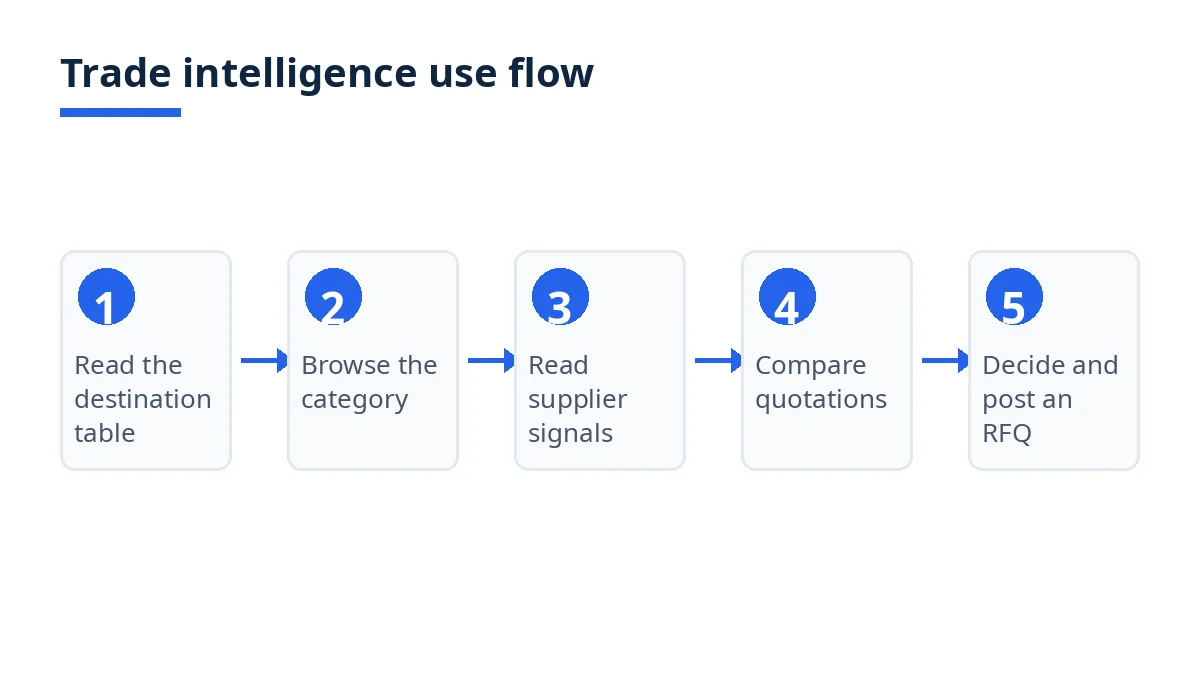
Open the Trade Intelligence page and read the source note on each row. Note the source, period ending 30 Jun 2026, provisional status, and retrieval date of 18 Sep 2026 before using any figure.1 Treat the values as market-scale context, not demand for your product.
Move from market totals to your category. Search by keyword and category, and filter or sort by Exportain Verified badge, sample availability, OEM/ODM capability, MOQ, or lead time.3 A destination total never answers whether a category has suppliers for your specification.
Read each supplier profile as two kinds of information. Verification level, location, and main products sit beside certifications the supplier has declared.3 Only checked items carry a badge.
Read the badge, then its limit, before weighting it. Exportain Verified covers identity, phone, email, and business registration; Export Verified covers the Export Registration Certificate; Factory Verified or Trading Company Verified covers facility photos; Trusted Trader covers completed orders on Exportain with no disputes.5 None guarantees capacity, quality, or delivery.5
Test listing terms through a quotation, not by assuming them. Quotations are versioned, stating unit price, MOQ, lead time, Incoterm, payment terms, and validity, with counter-offers in the same thread.3 Acceptance creates an order record with those terms attached.7
Check the service side only where you need it. Freight, customs, and inspection providers publish price, coverage, and turnaround on their listings.2
Example: a buyer planning shipments to the United States notes the $9.05B destination figure as market-scale context, then checks whether listings and profiles support the specific product, MOQ, and lead time needed.1 3
Tips
Read the source note before the number. Source, period, provisional or final status, and retrieval date decide how much weight a figure can carry.
Never turn a market total into a product forecast. Destination values cover all exports to that market. Product demand has to be tested through listings, profiles, and quotations.
Separate checked from declared on every profile. Badges record staff-reviewed checks; certifications and capabilities the supplier declared are the supplier's own statements until tested.
Use the quotation record as the comparison table. Versioned quotations put price, MOQ, lead time, Incoterm, and validity side by side.3 7
Check the retrieval date on your next visit. No refresh schedule is published on the Trade Intelligence page, so the retrieved date on each row is the only freshness signal the page gives.
FAQs
Is it free?
No buyer fee for reading the Trade Intelligence page or a supplier profile appears on the pages read, so none is stated here. Seller plans are priced separately, Free, Gold at 499 BDT per month, and Platinum at 999 BDT per month, but they are seller plans, not a buyer fee, and they never grant a badge.6
How long does it take?
No waiting period or approval step is published for using the page, since the table is already published on a public page. No refresh schedule is published either: the rows as read carry a retrieval date of 18 Sep 2026, so a returning buyer should check whether the rows have been updated.1
Who can use it?
International buyers sourcing from Bangladesh are the main readers, using the data before shortlisting and again while comparing quotations. The pages read are public, and Bangladeshi sellers and service providers appear in the same data.2 4
Where can I get support?
No email address, phone number, or dedicated trade-data contact appears on the pages read, so none is given here. The routes described are a dispute raised on an order, reviewed against the recorded history, and a fraud or misrepresentation report sent to the verification team, handled by people, not automatically.5 7 For a figure itself, the source note on the row is the reference the page gives.1
Next steps on Exportain
Start with the data itself: Exportain Trade Intelligence. Then read How to Source and Buy from Bangladesh for the eight buying steps, Exportain Trust Center for verification and dispute routes, and Exportain Buyer Protection for the shorter protection summary. When your shortlist is ready, post a free RFQ: Post an RFQ.
Sources
- Bangladesh Export Statistics (EPB). Exportain (accessed )
- Exportain | Bangladesh B2B Export Marketplace. Exportain (accessed )
- How to source and buy from Bangladesh. Exportain (accessed )
- Bangladeshi Manufacturers & Exporters. Exportain (accessed )
- Trust & Safety Center. Exportain (accessed )
- Seller Membership & Quota Plans. Exportain (accessed )
- Buyer protection: What Exportain does to protect buyers. Exportain (accessed )
About the author
Sourcing from Bangladesh?
Post a request for quotation and suppliers on Exportain can send you their quotes directly.
Post an RFQ