

Exportain Supplier Verification Badges
Exportain supplier verification badges explained: what Exportain Verified, Export Verified, Factory Verified, Trading Company Verified and Trusted Trader each mean, what they do not prove, and how to read them when shortlisting suppliers.
Short answer
Exportain supplier verification badges record which document or photo checks staff have reviewed for a Bangladeshi supplier. This guide explains what each of the five badges means, what no badge can prove, and how a buyer should read badges when ordering a shortlist before running separate checks.
On this page
A supplier verification badge on Exportain is a short record of a check that Exportain staff have reviewed. It tells a buyer which document or photo check sits behind the label, and it stops there. This guide explains the five badges, how a supplier earns one, what no badge proves, and how to use badges to order a shortlist.
What it is
Supplier verification on Exportain is a document review by the Exportain team. It is not a factory inspection, and it is not a check against any government database.1 A Bangladeshi supplier submits each check separately. Every submission is reviewed by Exportain staff and approved, returned for changes, or rejected. Approved checks earn trust badges, which appear on the supplier profile, on product cards, and on directory rows.1 2
Each badge names one thing that was checked:
Badge | Means | Does not mean |
|---|---|---|
Exportain Verified | Exportain has checked the seller identity, phone, email, and business registration | The seller can export, or can meet a delivery date |
Export Verified | Exportain has checked the seller Export Registration Certificate (ERC) | The seller has shipped a given volume, or holds a given capacity |
Factory Verified | Exportain has reviewed photos of the manufacturer factory | The factory was visited, or its output was inspected |
Trading Company Verified | Exportain has reviewed photos of the trading company office or warehouse | The company makes the goods itself |
Trusted Trader | The seller has completed orders on Exportain with no disputes | Current product quality, or delivery on a future order |
The first badge covers four checks together: a government ID and a live selfie, one-time codes confirming phone and email, and business registration in the form of a trade license and, where provided, a TIN and incorporation documents.1 Export Verified rests on one document, the ERC. Factory Verified and Trading Company Verified rest on photos only, and which applies depends on whether the company makes goods or trades them.1
Two limits apply to every badge on the table. First, a badge is not a guarantee of production capacity, product quality, or delivery.1 Second, a company without a badge shows nothing, not a grey placeholder.1 A missing badge therefore means a check has not been approved. It does not mean the supplier failed that check.
Verification is free and never purchased.1 That point matters when a profile carries a paid-looking label next to a badge, because the two are separate products.
Who it is for
This guide is for an international buyer comparing Bangladeshi suppliers on Exportain who needs to decide which profiles deserve a closer look. Badges are most useful at the shortlist stage, when a buyer holds several profiles for the same product. A buyer who reads the badge table first can sort profiles by what has actually been checked, rather than by how complete a profile looks.
The other side of the badge is the Bangladeshi seller. Sellers submit the checks, and staff review each submission on its own. Seller membership plans sit beside that process, not inside it: Free at no charge, Gold at 499 BDT per month, and Platinum at 999 BDT per month, with different listing quotas, inquiry limits, and team seats.3 Membership never grants a verification badge, and verification is reviewed separately.1 3 A Gold Member or Platinum Member label on a company page records a plan. It is not a trust badge.
The supplier directory lists registered suppliers, with trust badges shown on each row that has earned them.2
Step-by-step with screenshots
The steps below follow the published platform text rather than reproducing screens, which the public platform pages do not show. The diagram below shows the badge-reading flow in five stages.
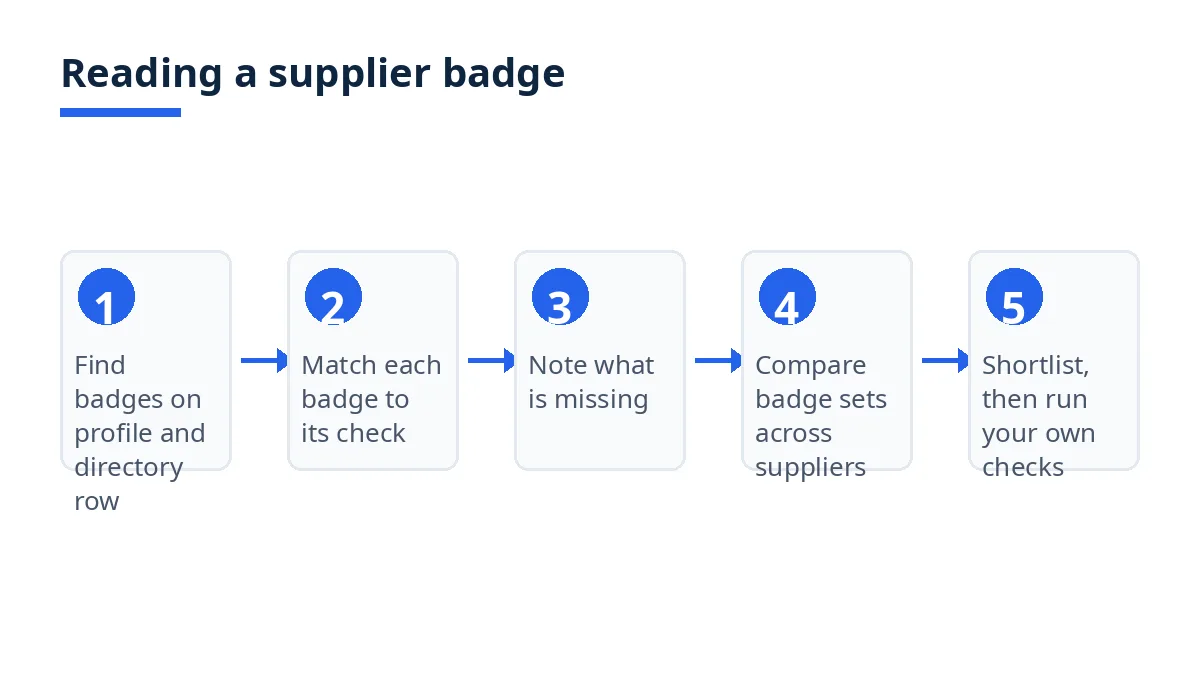
Find the badges on the profile, the product card, and the directory row. Start with the directory row, then open the profile. A badge on a product card should match the badge on the profile behind it.1 2
Match each badge to its check, using the table above. The table gives the check behind each badge name, so no badge needs to be guessed at.1
Note what is missing, and read the gap correctly. A missing badge means that check has not been approved. Do not treat a profile with Exportain Verified alone as export-ready, because export registration is a separate check with its own badge.1 Do not treat a missing Factory Verified badge as proof that a company has no factory, because the check may not have been submitted or approved.
Compare like with like across the shortlist. Put suppliers with the same badge set next to each other, and keep suppliers with different badge sets apart. A supplier with Export Verified and Factory Verified has had different checks reviewed than one with Exportain Verified alone, so ranking on badge count alone would hide that difference. The table, not the count, is the comparison.
Use the badge result to order your own checks, not to replace them. Keep the suppliers whose badges match your question at the top of the shortlist, and set the rest aside. Then run the checks no badge covers, such as a sample and the commercial terms, before committing to an order. A badge shortens the shortlist. It does not close the buying decision.
Shortlist examples show how the table changes a decision. A buyer who needs goods shipped from Bangladesh should weight Export Verified, because that badge is tied to the ERC, while a buyer choosing between a maker and a trader should weight the difference between Factory Verified and Trading Company Verified, because only one says photos of a factory were reviewed.1 A buyer comparing two similar profiles should read Trusted Trader as order history on Exportain with no disputes, not as a statement about the next order.1 In each case, the badge answers one narrow question.
Tips
Read the badge name, not the label around it. A plan label records membership. A badge records a check staff reviewed.1 3
Ask which question each badge answers before you rely on it. Export Verified answers an export-registration question. It does not answer a capacity or quality question.1
Treat a missing badge as unapproved, not as failed. A gap in the table is a prompt to ask, not a verdict.1
Compare badge sets, not badge counts. Two badges can cover different checks, so the set matters more than the number.1
Keep badges in the shortlist stage. Verification is a document and photo review, not a factory inspection and not a check against any government database.1
FAQs
Is it free?
Verification itself is free and never purchased.1 The membership page lists seller plans only: Free at no charge, Gold at 499 BDT per month, and Platinum at 999 BDT per month, governing seller listing quotas and inquiry limits.3 No page read for this guide lists a buyer fee for searching the supplier directory or reading a profile, and membership plans never grant a trust badge.1 3
How long does it take?
No fixed timeline for verification review is published on the platform pages read for this guide. Each submission is approved, returned for changes, or rejected by staff, and no page states a number of days for any outcome.1 The pages give no figure to plan around, so this guide gives none.
Who can use it?
International buyers sourcing from Bangladesh through Exportain can use badges when comparing suppliers, and registered Bangladeshi suppliers earn them through separate submissions.1 2 Buyer and supplier accounts confirm ownership of an email address or phone number with a one-time code.1 A buyer who cannot see a badge on a profile should check the directory row and product card for the same supplier, since badges appear in all three places.1 2
Where can I get support?
If the problem is suspected fraud or misrepresentation, such as a counterfeit certificate, a company claiming a factory it does not represent, or a listing that misstates its product, report it to the trust and safety team, where reports are reviewed by a person.1 If a supplier does not honour accepted terms on an order, contact Exportain with the order reference, so the team can review the recorded RFQ, quotation, and message history.4 No email address or phone number for support appears on the platform pages read for this guide, so none is given here. Exportain may suspend or remove accounts that breach the terms of use, but it cannot compel payment or delivery.1
Next steps on Exportain
Read the badge rules first: Trust Center. Then read Buyer Protection for what a badge does and does not do inside a wider order, and Membership to see why a plan label is not a trust badge. When your shortlist is ready, post a free RFQ on Exportain and compare the quotations against the badges you have read.
Sources
- Trust & Safety Center. Exportain (accessed )
- Bangladeshi Manufacturers & Exporters. Exportain (accessed )
- Seller Membership & Quota Plans. Exportain (accessed )
- Buyer protection: What Exportain does to protect buyers. Exportain (accessed )
About the author
Sourcing from Bangladesh?
Post a request for quotation and suppliers on Exportain can send you their quotes directly.
Post an RFQ


