How to Sell on Exportain
How to sell on Exportain: register, verify separately, publish listings, quote on RFQs and settle on agreed terms, following the six steps on the live selling page.
Short answer
Selling on Exportain means working through one sequence: register a seller account, apply for verification, publish product listings, respond to buying leads, quote and negotiate, and then settle and ship on the terms both sides accepted. Listing products and quoting on RFQs is free, and verification is free and reviewed separately from any membership plan, so a paid plan never grants a verification badge.
On this page
Selling on Exportain means working through one sequence: register a seller account, apply for verification, publish product listings, respond to buying leads, quote and negotiate, and then settle and ship on the terms both sides accepted. Listing products and quoting on RFQs is free, and verification is free and reviewed separately from any membership plan, so a paid plan never grants a verification badge.1 2
What it is
This guide covers the seller journey only: the path from a new seller account to a first accepted quotation and a completed trade. The selling page presents the journey in six steps and states that listing products and quoting on RFQs is free.1 Nothing in this guide adds a fee, a timeline, or a promise the pages do not state.
Neighbouring guides answer different questions, each summarised here in one line. The seller membership guide compares the Free, Gold, and Platinum plans and their listing quotas, rather than walking the selling steps. The Trust Center hub explains verification checks, badge meanings, and safety rules. The buying guide walks the buyer side, from searching the catalogue to arranging freight and inspection. The provider plans guide covers trade service providers, not seller listings. The trade intelligence guide covers published export data signals, not the act of selling.
A seller account starts with a company profile, which is what buyers read first. Registration adds name, location, main products, and the certifications held, and a listing adds specifications, MOQ, lead time, price range, HS code, sample availability, and OEM/ODM capability.1 Verification sits beside that profile: staff review each check submitted in the seller portal verification centre, and approved checks earn trust badges shown on the profile and listings.2 3 A badge records checks reviewed, not a guarantee of production capacity, product quality, or delivery.3
Membership is separate from the journey, and this guide does not repeat the plan comparison table. In brief, the membership page lists Free at 0 BDT, Gold at 499 BDT per month, and Platinum at 999 BDT per month, with listing quotas of 5, 30, and 60, and states that membership never grants a verification badge.2 The journey works on any plan, because listing and quoting are free and the steps do not change with the tier.
Who it is for
This guide is for Bangladeshi sellers who want to list products for international buyers: manufacturers, mills, export houses, and trading companies. The selling page is written for Bangladeshi exporters, and the RFQ page states that registered Bangladeshi suppliers can submit a quotation against open buying leads.1 4 A trading company follows the same steps; its facility check uses photos of its office or warehouse.3
It is also for a seller who has registered but has not yet published, quoted, or completed a trade. The profile, listings, and quotation fields are the same for a first-time seller and an established exporter; what changes with experience is catalogue size and quotation volume, not the sequence. A buyer should not follow this guide: buyers search, post RFQs, and compare quotations through the buying route on the How to Buy page.5
Buyer-side protections sit on the Buyer Protection page, and full badge meanings sit on the Trust & Safety Center page.3 6
Step-by-step with screenshots
No screenshots are reproduced in this section. The live selling page as read on 2026-10-25 presents its six steps as text, not as reproduced screen images, so the steps below follow that published page text in order, with supporting detail only from the other platform pages fetched for this guide.
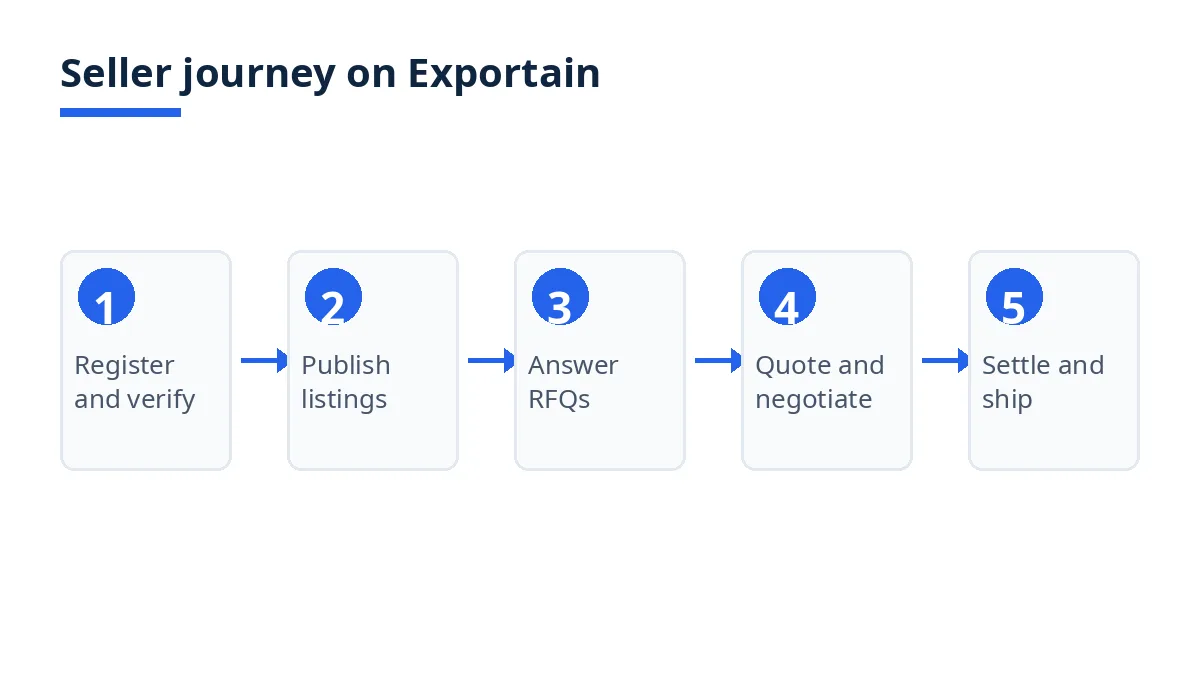
Register your company. Create a seller account with a one-time code, then add the company profile: name, location, main products, and the certifications held.1
Apply for verification. Complete each check in the seller portal verification centre: identity, business registration, export registration, and facility photos.1 Staff review each submission, and approved checks earn trust badges shown on the profile and listings.3 Verification is free and never purchased.2 3
Publish product listings. List products from the Seller Center with specifications, MOQ, lead time, price range, HS code, sample availability, and OEM/ODM capability.1 Drafts do not consume published quota: quotas are consumed only when a product is published.2
Respond to buying leads. Open RFQs are listed with quantity, destination, Incoterm, target price, and deadline.1 Filter by the categories sold and quote on the leads that can actually be supplied. The RFQs page lists open leads, and registered Bangladeshi suppliers can quote against any of them.4
Quote and negotiate. Submit a quotation with unit price, MOQ, lead time, Incoterm, payment terms, and validity.1 Counter-offers are versioned in the same thread, and an accepted quotation becomes an order record.1
Settle and ship on agreed terms. Payment is settled directly with the buyer on the accepted terms, unless the seller asks for a funds hold of up to the order value and the buyer pays it.1 Once the seller has filed an export clearance document and the buyer has confirmed the trade complete, Exportain pays the hold to the seller's approved Bangladeshi bank account in taka within 7 days, less card and bank costs at their actual amounts and a 0.5% platform fee.1 Use the trade services directory for freight, customs, and documentation partners.1
The selling page as read states no timeline for registration or verification review, so this guide states none. The only timeline above is the 7-day hold release, after both release conditions are met and only where a hold was agreed and paid.
Tips
Fill every listing field the selling page names, because buyers filter and compare on those fields: specifications, MOQ, lead time, price range, HS code, sample availability, and OEM/ODM capability.1 A listing missing its MOQ or lead time leaves a buyer without two facts the buying page uses for sorting.5
Filter RFQs before quoting. Open leads carry quantity, destination, Incoterm, target price, and deadline, and the selling page directs sellers to filter by the categories they sell in.1 Quote only on leads that can be supplied, keep every change in the versioned counter-offer thread, and keep verification on its own track: complete each check separately, treat any badge as a record of a document review, and never describe a membership label as a badge.1 3
Check the listing quota before publishing beyond it. The Free, Gold, and Platinum quotas are 5, 30, and 60 published listings, and drafts do not consume quota, so a long draft list is not by itself a reason to change plan.2 A tier does not change the selling steps, and listing and quoting are free.1 2
Treat the funds hold as optional, not as the default. The seller can ask for a hold of up to the order value, but the buyer chooses whether to pay it, and without a hold, payment is arranged directly between buyer and seller on the accepted terms.1 Agree inspection and shipment conditions in writing before settling, since the accepted quotation is the record both sides hold.5
FAQs
Is it free?
Listing products and quoting on RFQs is free, as the selling page states in its introduction.1 Verification is also free: the Trust Center states that verification is free and never purchased, and that membership plans are a separate product.3 Seller membership plans are separate from that free core: Free is listed at 0 BDT, Gold at 499 BDT per month, and Platinum at 999 BDT per month, recurring until cancelled.2
How long does it take?
The selling page as read states no timeline for registration or verification review, and the Trust Center page as read states no review timeline either, so this guide gives no timeline for either step.1 3 The only timeline the selling page states is the funds-hold release: within 7 days after the seller has filed an export clearance document and the buyer has confirmed the trade complete, where a hold was agreed and paid.1
Who can use it?
Bangladeshi sellers, including manufacturers, mills, export houses, and trading companies, can use the selling steps in this guide.1 The RFQ page confirms that registered Bangladeshi suppliers can submit quotations against open buying leads.4 Buyers do not use this guide: they search, post RFQs, and compare quotations through the buying route on the How to Buy page.5
Where can I get support?
The selling, membership, and Trust Center pages as read for this guide do not publish a seller support email or phone number in the fetched text, so this guide does not list one. For verification questions, use the verification centre in the seller portal and the Trust & Safety Center page, which explains each check, each badge, and how to report a problem.3 For plan questions, read the Seller Membership Plans page.2
Next steps on Exportain
Read the Seller Membership Plans page to check quotas before publishing, read the Trust & Safety Center page before applying for verification, and browse open leads on the RFQs page.
Start selling on Exportain → How to Sell on Exportain
Sources
- How to Sell on Exportain as a Bangladeshi Exporter. Exportain (accessed )
- Seller Membership & Quota Plans. Exportain (accessed )
- Trust & Safety Center. Exportain (accessed )
- RFQs & Buying Leads from International Buyers. Exportain (accessed )
- How to source and buy from Bangladesh. Exportain (accessed )
- Buyer protection: What Exportain does to protect buyers. Exportain (accessed )
About the author
Sourcing from Bangladesh?
Post a request for quotation and suppliers on Exportain can send you their quotes directly.
Post an RFQ