Exportain Membership Plans for Sellers
Exportain seller membership plans compared: Free, Gold at 499 BDT per month and Platinum at 999 BDT per month, with listing quotas, inquiry limits, team seats and the verification distinction.
Short answer
Exportain offers sellers three membership plans: Free at 0 BDT, Gold at 499 BDT per month, and Platinum at 999 BDT per month. The tiers differ mainly in published product listings, buyer inquiry and RFQ quotation limits, team seats, and the member label shown on the company page. Membership is separate from verification, which is free and reviewed separately, so a paid plan does not grant a verification badge.
On this page
Exportain offers sellers three membership plans: Free at 0 BDT, Gold at 499 BDT per month, and Platinum at 999 BDT per month. The tiers differ mainly in published product listings, buyer inquiry and RFQ quotation limits, team seats, and the member label shown on the company page. Membership is separate from verification, which is free and reviewed separately, so a paid plan does not grant a verification badge.1
What it is
A seller membership plan sets the listing, inquiry, and team limits for a seller account: Free is core product listing and basic RFQ matching at no charge, and paid plans add expanded listing capacity, unlimited buyer inquiries, and team workflows.1 The table below repeats the quotas exactly as published on 2026-10-25.
Plan | Price per month | Published product listings | Buyer direct inquiries | RFQ quotations | Team seats | Member label |
|---|---|---|---|---|---|---|
Free | 0 BDT, labelled Free Forever | 5 | 10 per month | 10 per month | 1 account user seat | None stated |
Gold | 499 BDT | 30 | Unlimited, shown with an asterisk on the page | Unlimited | Up to 2 | Gold Member |
Platinum | 999 BDT | 60 | Unlimited | Unlimited | Up to 10 | Platinum Member |
The Free plan also includes a factory profile and logo.1 Gold is described on the page for active export mills seeking direct wholesale buyers and a larger catalogue, and Platinum for high-volume vertical composite mills and export houses: the page's own audience wording, not a rule about who may join a tier.1
Two published rules affect quotas. First, drafts do not consume published quota: quotas are consumed only when a product is published.1 Second, on a downgrade from Gold (30 products) to Free (5 products), no products are deleted: the top 5 remain active and 25 are archived, ready to restore upon upgrade.1 Prices are per month in Bangladeshi taka and recur until cancelled.1 Mid-month pricing, what a downgrade forfeits, and what happens to listings when a plan ends are set out in the Payment and Membership Terms and the Refund Policy named on the membership page; this guide does not restate terms it did not open.1
This article covers seller membership plans only. Neighbouring guides, each summarised here in one line and linked onward where its platform page was confirmed live, cover different questions: the Trust Center hub (verification and safety), the buying guide (buyer journey), the RFQ guide (posting a lead), the buyer protection guide (buyer-side protections), the badges guide (badge meanings), and the trade intelligence guide (export data signals).
Who it is for
This guide is for Bangladeshi sellers, manufacturers, mills, and export houses choosing between Free, Gold, and Platinum. The selling guide sets out six steps from registration to a first accepted quotation: register, apply for verification, publish listings, respond to buying leads, quote and negotiate, and settle and ship on agreed terms.2 Membership choice sits inside that sequence, after registration and alongside listing, once the seller has added a company profile with name, location, main products, and certifications held.2
Membership is not verification. Verification is a document review by the Exportain team, not a factory inspection and not a check against any government database, and approved checks earn trust badges shown on the profile, product cards, and directory rows.3 The Trust Center states that verification is free and never purchased, and that membership plans are a separate product and never grant a trust badge.3 Neither a Gold Member nor a Platinum Member label is a verification badge.
Buyers read seller profiles through their own route: the buying guide describes searching by keyword and category, filtering to suppliers holding the Exportain Verified badge, sample availability, and OEM/ODM capability, and sorting by MOQ or lead time.4 A membership label answers a different question: how much catalogue and contact volume the account allows, not which checks staff have reviewed. Buyer protection is likewise buyer-side: document review, a quotation history both sides can see, private document storage, and a way to report problems, with no guarantee the platform does not operate.5 Open buying leads are listed on the RFQ page, where registered Bangladeshi suppliers can submit a quotation against any of them.6
Step-by-step with screenshots
No screenshots are reproduced in this section. The live membership and selling pages as read on 2026-10-25 show plan text and a comparison table, not step screenshots, so the steps below follow the published page text. The membership page does not publish a click-by-click checkout sequence, so these steps are the decisions and checks the published pages support, in order.
Register a seller account and complete the company profile: a one-time code at registration, then name, location, main products, and certifications held.2
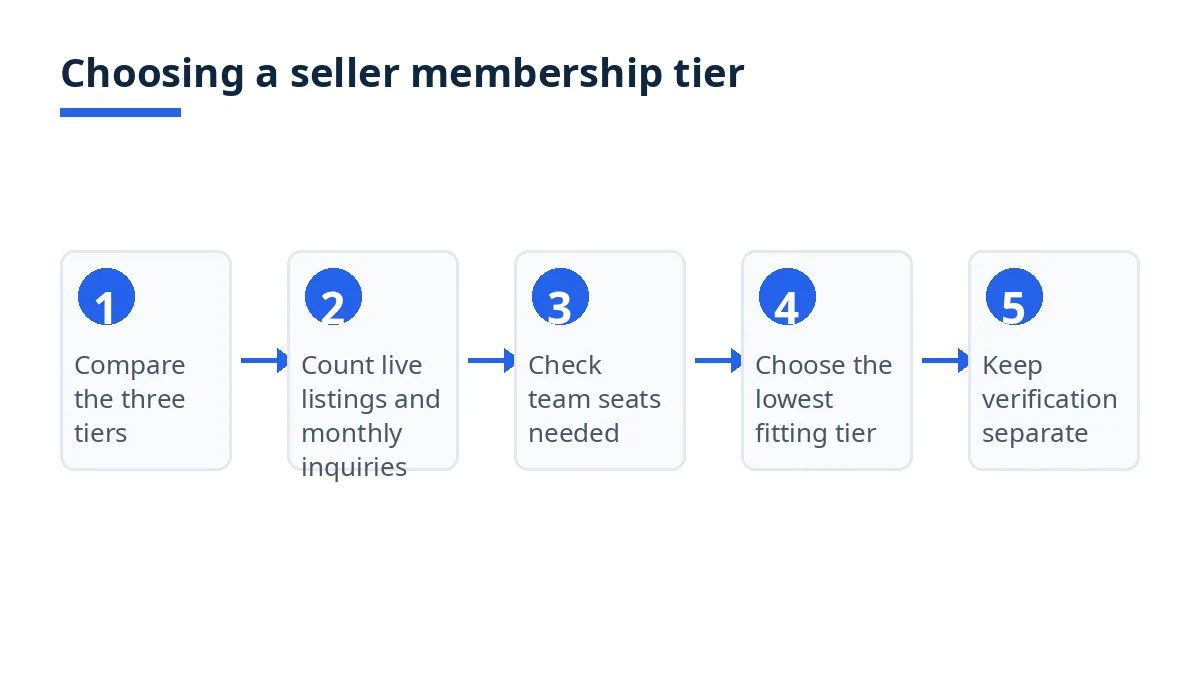
Read the membership plan comparison table, including quotas for listings, inquiries, RFQ quotations, seats, and labels.1
Count planned published listings against the quotas of 5, 30, and 60, and monthly inquiries and RFQ quotations against the Free caps of 10 and 10.1
Choose the lowest tier whose quotas cover that count, remembering that drafts do not consume published quota.1
Apply for verification separately, through the checks for identity, business registration, export registration, and facility photos, since a paid plan never grants a badge.2 3
Publish listings within the chosen quota, respond to buying leads in the categories sold, and quote with unit price, MOQ, lead time, Incoterm, payment terms, and validity.2
Before any downgrade, note the published rule: products are not deleted, the top 5 remain active on a move to Free, and archived listings are ready to restore upon upgrade.1
The membership page as read states no start date or processing time for a plan change, so this guide states none.1
Tips
Start from the listing count, not the label. A seller with five or fewer published products, and with monthly inquiries and RFQ quotations inside the Free caps, gains no extra quota from a paid tier until volume grows past those caps. Because drafts do not consume published quota, a long draft list is not by itself a reason to upgrade.1
Match the tier to the binding limit: listings (5, 30, or 60), contact volume (Free caps of 10 and 10 per month, against unlimited inquiries and quotations on Gold and Platinum, noting the asterisk beside Gold unlimited inquiries), or seats (1, 2, or up to 10).1 Keep verification on its own track: complete each check in the seller portal, treat any badge as a record of a document review rather than a guarantee, never promise a buyer a verification outcome, and never describe a member label as a badge.3 Treat the downgrade rule as a safety check, not a plan: archived listings are not active while archived, so confirm which listings stay active before downgrading, and review the plan whenever catalogue or monthly volume changes materially.1
FAQs
Is it free?
The Free plan is listed at 0 BDT and labelled Free Forever, with 5 listings, 10 buyer direct inquiries per month, 10 RFQ quotations per month, a factory profile and logo, and 1 seat.1 Gold costs 499 BDT per month and Platinum 999 BDT per month, recurring until cancelled.1 Verification is free for every seller and reviewed separately from membership.1
How long does it take?
The membership page as read states no processing time or start date for joining or changing a plan, so this guide gives no timeline for a plan change, and the selling guide likewise gives no timeline for registration or verification in the text read.2 Plan around the published quotas and rules, not around an assumed start date.
Who can use it?
Seller membership plans are for sellers on Exportain, including Bangladeshi manufacturers, mills, and export houses that list products and quote on buying leads.1 2 The buying guide, protection guide, and RFQ page address buyers and buying leads, not seller membership, and a buyer needs no seller plan to search the catalogue or post a lead.4 6
Where can I get support?
The membership and selling pages read for this article do not publish a seller support email or phone number in the text fetched, so this guide does not list one. For verification, account security, and reporting a problem, use the Trust Center.3 For buyer-side protections and reporting a supplier, use the buyer protection page.5 For account matters, use the pages linked here and the seller portal, rather than a contact detail this guide cannot verify.
Next steps on Exportain
Read the plan comparison on the Seller Membership Plans page, then follow How to Sell on Exportain to register, verify separately, and publish within quota. Also read the Trust & Safety Center, How to Buy, and Buyer Protection pages, and browse open leads on the RFQs page.
Become a verified Exportain seller and reach global buyers → How to Sell on Exportain
Sources
- Seller Membership & Quota Plans. Exportain (accessed )
- How to Sell on Exportain as a Bangladeshi Exporter. Exportain (accessed )
- Trust & Safety Center. Exportain (accessed )
- How to source and buy from Bangladesh. Exportain (accessed )
- Buyer protection: What Exportain does to protect buyers. Exportain (accessed )
- RFQs & Buying Leads from International Buyers. Exportain (accessed )
About the author
Sourcing from Bangladesh?
Post a request for quotation and suppliers on Exportain can send you their quotes directly.
Post an RFQ